



Enter your email address below to sign up for a gift registry:
Enter your email address below to send your gift registry to loved ones:
Enter your email address below to change your gift registry information:
Enter your email address below to manage the books on your gift registry:
Instructions: Gift Registry
What is the Gift Registry? Our Gift Registry allows you to send a list of books that you've marked "Unread" on your custom Book List to family or friends so that they'll know which Susan Mallery books you haven't read yet! We've also provided the ability for you to manage your Gift Registry by de-selecting books that you do not want listed (since by default, all Unread books are shown).
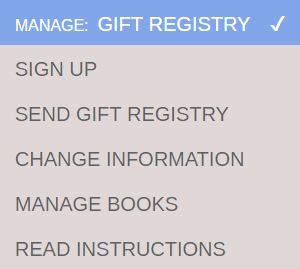
How do I sign up for the Gift Registry? The first step is to make sure you've made a Custom Book List. Please use the ACCESS: BOOK LIST FEATURE drop down and select READ INSTRUCTIONS. Otherwise, if you've already made a custom Book List, use the MANAGE: GIFT REGISTRY drop down and select SIGN UP.
Depending on whether or not you've retrieved your custom Book List, you'll get either an email form to sign up or a button as shown below:

On the Gift Registry sign up form, make sure you select your preference for print and/or ebook format. If you select ebook, select your preferred device(s) so that your loved one knows which format to purchase. We've only listed ebook formats from retailers who offer purchasing ebooks as gifts for someone else.
How do I send the Gift Registry? Once you've signed up for the Gift Registry, you can access the page to send your Gift Registry by using the MANAGE: GIFT REGISTRY drop down and selecting SEND GIFT REGISTRY. Depending on whether or not you've retrieved your custom Book List, you'll get either an email form to send the registry or a button as shown below:

How do I change my preferences on the Gift Registry? You can access the page to change your Gift Registry preferences by using the MANAGE: GIFT REGISTRY drop down and selecting CHANGE INFORMATION. From this page, you can change your first and last name as well as your preferences for print/ebook formats. Depending on whether or not you've retrieved your custom Book List, you'll get either an email form to change your information or a button as shown below:

How do I manage my books on the Gift Registry? If you want to take any of your Unread books off the Gift Registry, you can do so by using the MANAGE: GIFT REGISTRY drop down and selecting MANAGE BOOKS. Depending on whether or not you've retrieved your custom Book List, you'll get either an email form to change your information or a button as shown below:

From this page, you can decide which books will display by moving the slider left or right. You'll also see which books have been marked bought.

That's it! Enjoy!
Enter your email address below to retrieve your list:
Enter your email address below to make your list:
Instructions: Book List Feature
What is the Book List Feature? Our Book List Feature allows you to mark Susan's books as Read, Unread or Unsure, which will then automatically save your custom Book List. Once you've done that, you'll be able to View/Print your Book List (either for easy access to buy links or to print a shopping list). In addition, we've added a Gift Registry so that you can send a list of your Unread books to Loved Ones.
How do I use the Book List Feature? If you scroll down the page, you'll see a box below each of Susan's books. Until you create or retrieve your custom book list, these radio buttons will be disabled.

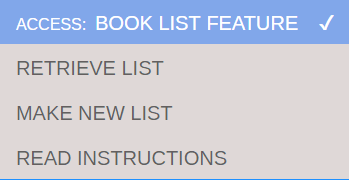
All of the controls for the Book List Feature are now in the drop down at the top of the page. Simply use your mouse or your keyboard to make your selection. If you've already made a custom Book List, simply select Retrieve List. If you have not made a custom Book List, select Make New List.
You'll then be given a box to input your email and either retrieve your existing Book List or make a new Book List.

Once you make a new list or retrieve an existing list, you'll see a welcome message at the top of this page along with a button to VIEW/PRINT MY LIST. You can now make changes to your Read, Unread or Unsure selections next to each book. Your selections will automatically be saved when you make a new selection.

Please feel free to use the drop downs or browse the website as normal. When you return to the Available Now page, your custom Book List will display until you close the browser. (Note: this is a change from the previous version of the Book List feature.)